to-9km-and-beyond
Multi-Disciplinary Analysis (MDA) Tool for Subsonic Aircraft Analysis
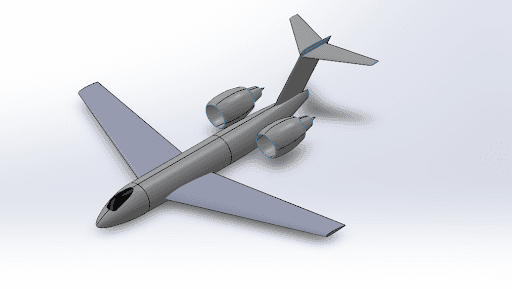
Aircraft Visualization: Optimized Configuration
Note: The README in this GitHub repository is significantly more detailed than this website.
Optimized Results Summary
● Wing Weight (Steel) = 1,340 kg (2,960 lbm)
● Total Airplane Weight (Composite) = 24,100 kg (53,200 lbm), before the automatic adjustment up to the 25,000 kg minimum
Note: Any airplanes below the 25,000 kg (55,100 lbm) minimum takeoff weight were automatically adjusted. My simulation assumes composite wings (SMUDGE_FACTOR = 0.85).
Main Objective
The main objective of this program is to be used to optimize the main wing of an aircraft to beat the FAI record for C-1k planes climbing to 9,000 m (29,500 ft) with a 1,000 kg (2,200 lbm) payload (https://fai.org/record/4918), currently held by Gary M. Freeman. In other words, the goal of this program is to be used to optimize a main wing around the airplane's climb time to 9,000 m.
For any aircraft configuration (set by the user), this program will also produce best wing* and its corresponding climb time to 9,000 m. This climb time can then be compared to Freeman's 5 min 54s record, and the best wing found in the Results below climbs to 9,000 m in 3.96 min. Using this program, one can easily design (at least the wing) of an airplane, which can beat Freeman's record.
Note: The program is currently set up to output the simulation data into the console, and produce two .csv files. One csv file is a bunch of wing spans simulated, and one csv file is a bunch of sweep angles simulated for the best span. Currently, the program is set up to only simulate 25 wing spans, and 25 sweep angles*. In order for it to act as an optimizer, increase the number of simulations to 200+ for span and 100+ for sweep angle, or drastically reduce the range.
* The program is set up in the current manner, in order for a user to be able to easily see how it works, without needing to wait 10 mins for a bunch of simulations. A user should expect to only wait around 1-2mins for the program to run with its current set up.
Coding Methodology Overview
A secondary goal of the project was to have the program be robust. Robust meaning that any component could be easily modified - in a safe manner - by any user familiar with C++. Classes (OOP) were used to accomplish this goal.
Every Airplane has (at least) a mainWing, a Horizontal Tail, a Vertical Tail, Engine(s), Nacelle(s), a Fuselage, a fuel weight, and a payload weight. So, each of the corresponding main components (everything that isn't a single float or integer variable) have their own classes.
"This methodology enables the Airplane class to treat each of these components as a 'black box.' It does not matter, from the Airplane Class's point of view, how the Wing object is implemented, just that we have a type Wing, and we can call on its public member functions."
Why C++
When I first started to brainstorm and outline how I wanted to do this project, I realized it would be a lot more readable if an OOP language was used. This is due to the fact that having classes is very desirable for this program (especially for its readability).
C++ is a low level, OOP, programming language, which enables more efficiency than say Python. Personally, I am also more familiar with C++ than any other programming language, since most of my Computer Science Minor has been taught in C++. The cost of getting this extra efficiency is that almost everything had to be built from the ground up (like kadenMath functions).
This project really benefits from being efficient. Since the goal is to optimize an object (the mainWing), it just made a lot of sense to use a language known for efficiency.
A Quick Word on Reusability
By programming using the aforementioned methodologies, the classes I developed in this project are, in many ways black boxes. Therefore, these classes are very re-usable, which is valuable to me because it saves me the time and effort of developing them for my other aero-related personal projects. Additionally, I developed each class to be very readable (to a person familiar with C++), which makes it easier to add to or change their respective implementations.
The tool is built on a strictly Object-Oriented (OOP) framework in C++, designed to mirror the physical hierarchy of an aircraft. By abstracting components like the Wing, Fuselage, and TurboFan into discrete classes, the architecture allows for highly modular simulations. The Airplane class acts as the orchestrator, pulling aerodynamic data from the DragCoeff and AtmosphereProperties utilities to solve the force balance equations at 0.05-second intervals. This modularity ensures that any component can be swapped (for instance, changing an airfoil profile or engine type) without refactoring the core simulation logic.
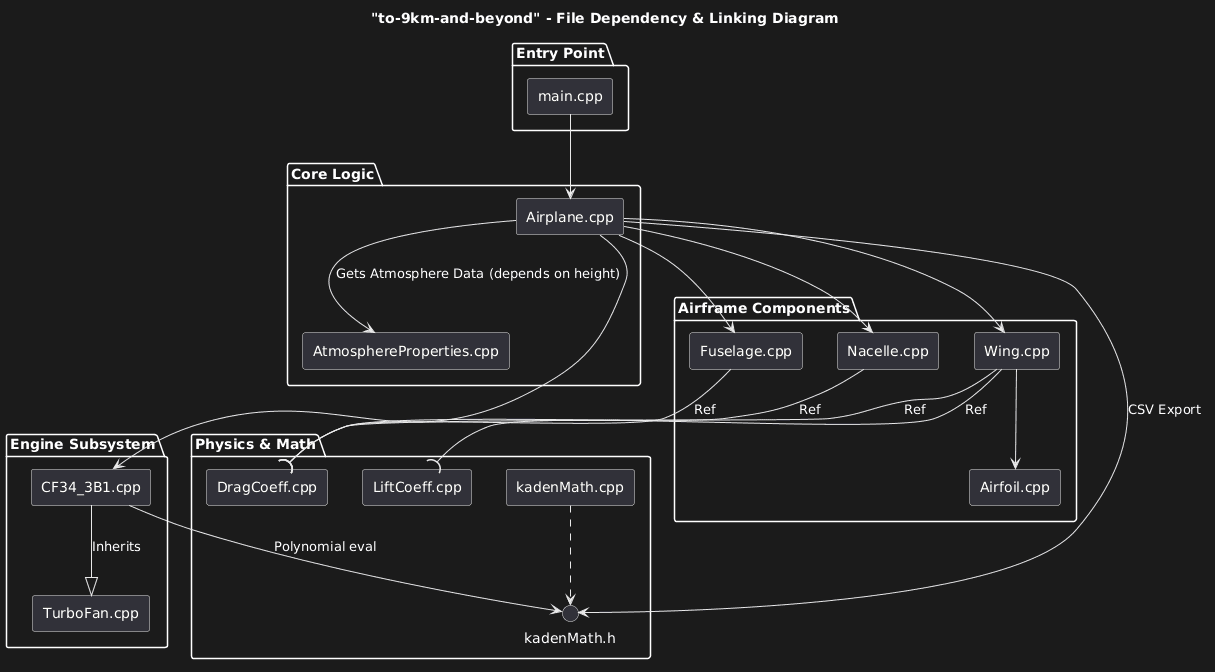 File Dependency & Linking Diagram
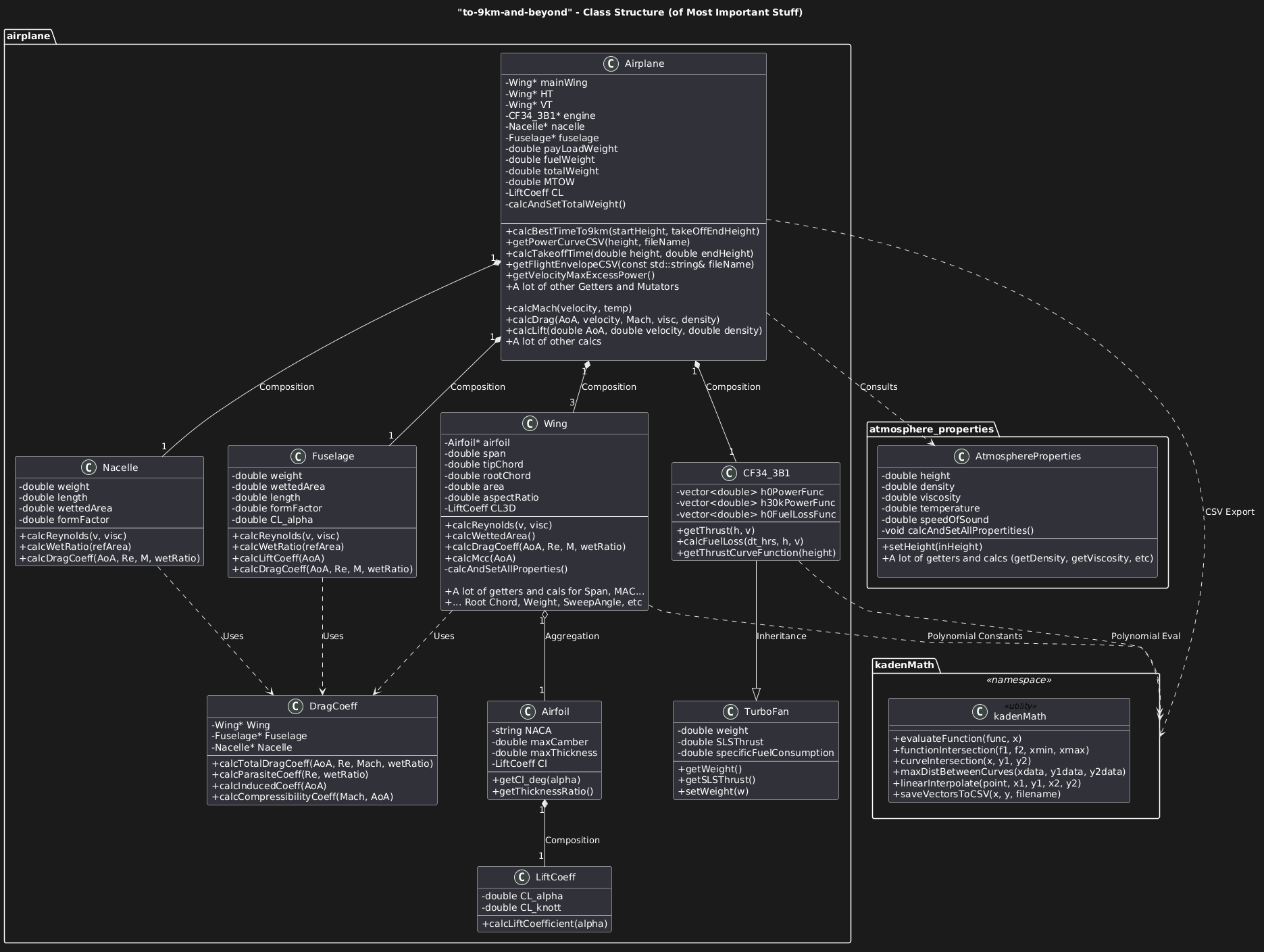 UML Diagram (Key Idea)
Drag Functions Overview
The drag functions for the three main objects of an airplane (Fuselage, Wing - note a VT, HT, and the mainWing are all “Wing” objects, and Nacelle) are provided by the DragCoeff class. The DragCoeff class has a “calcTotalDragCoeff()” that is implemented to work with any of those three objects.
This function relies on calcParasiteCoeff(), calcInducedCoeff(), calcCompressibilityCoeff(), and calcFormDragCoeff() in order to calculate the total DragCoeff of the object. I assume no separation drag, but in the Airplane Class, I account for this assumption (and other assumptions) by having an EXTRANEOUS_DRAG_MULTIPLIER that is currently set at 15%.
The form factor of any Fuselage object is assumed to be 1.2 and the form factor of any Nacelle object is assumed to be 1.5. This calcTotalDragCoeff() function is used by the Airplane Class (in a calcDragCoeff() - which gives the total airplane drag coefficient at the passed in parameters), namely for power curve functions, but also others.
Power Curve Functions Overview
Since the airplane I set out to analyze has a jet engine, a power curve is necessary to get the best time to climb. (Currently the project doesn’t work with a propeller). As will be explained later, the power curve for any airplane object is calculated at a time step (say 0.05s).
So in order to understand how much excess power the airplane has (and therefore its max rate of climb (RoC)), we need to generate the power curve and be able to calculate where the max excess power is and how much excess power the airplane currently has. This implementation is done discreetly through calcPowerCurveVelocityData(), calcPowerRequiredData(), and calcPowerAvailableData(). calcPowerAvailableData() depends on the CF_34_3B1, which has the thrust curves digitized.
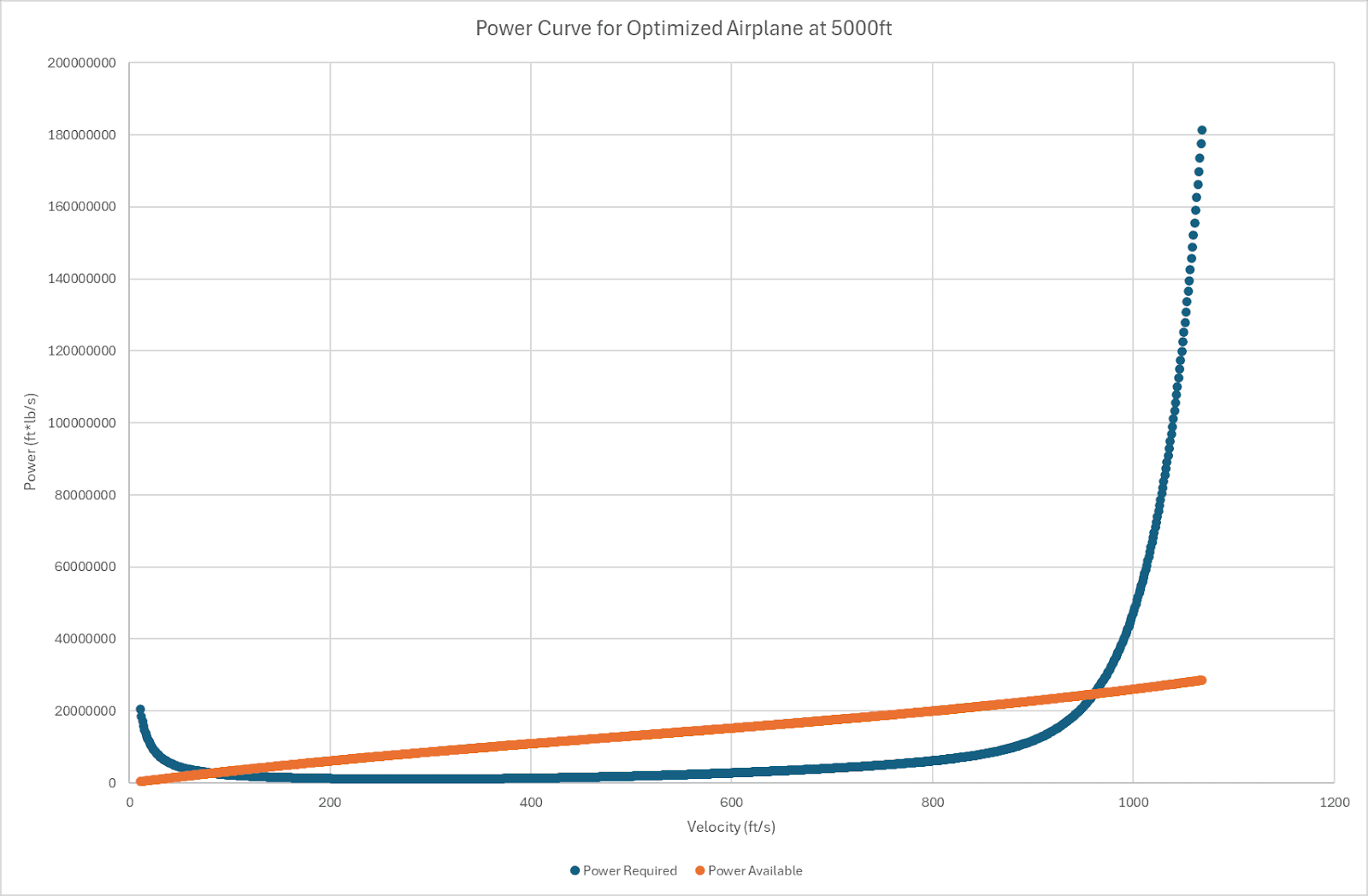 Power Curve Example
There are also two implementations of some of these functions (namely calcPowerRequiredData()), which differ depending on accounting for flight path angle (gamma) or not. In other words, one implementation assumes a small angle approx (power curve does not depend on gamma), while the other is the accurate power curve. Currently, due not being able to easily solve for gamma (and the time not changing significantly when experimenting with a constant gamma), the power curve functions independent of gamma (small angle approx versions) are used the most.
This program provides (in the Airplane class) a function getPowerCurveCSV(height), that produces the power curve of the initialized Airplane object, at any height the user passes in. Recall that the climb functions rely on calculating and analyzing this curve at very small time steps, so this function is more for the user to understand (and verify) that the power curves, which again are the backbone of the climb functions, make sense. It is also important to note that the implementation of calculating the maxExcessPower() and currentExcessPower() is done by custom math functions in “kadenMath.h”.
Time to Climb Function Overview
The short version of the climb function is, it's an implementation based on time steps. The power curve is calculated and solved at every time step. If the velocity for max excess power is outside of a certain error, a steady level acceleration function is called to accelerate to that velocity (and then climb continues at the new velocity).
If the velocity is inside the error, then we calculate the current excess power (not necessarily the max because of the error), and use that for our RoC. (Essentially height += (currentExcessPower / totalWeight) * TIME_STEP). See the implementation of calcBestTimeTo9km() which relies on calcTakeoffPropertites() and calcBestClimbTime() (which relies on calcSteadyLevelAccelerationTime()) in the Airplane Class for more details.
Finally, this program (in the Airplane class) also provides a getFlightEnvelopeCSV(). This flight envelope is by no means perfect, and does not have a bunch of constraints like structural feasibility, but it can still be useful to show that the program is working as intended (by the graph having resembling a typical flight envelope) and as a quick (first take) graph that can be used to compare different airplane configurations quickly.
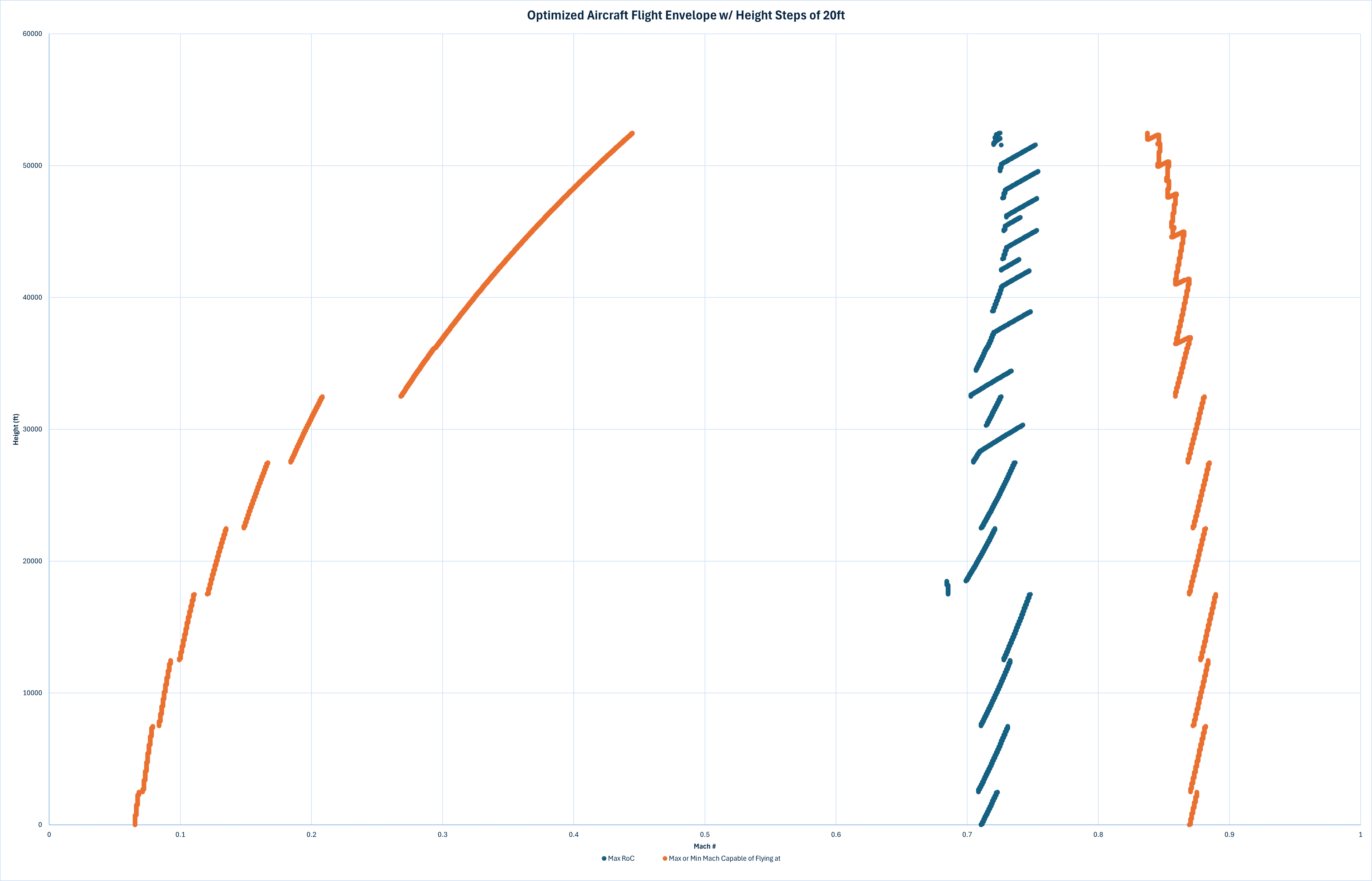 Rough Flight Envelope
Note: It would be fairly quick to implement a block of logic in the calcTimeTo9km() to output CL or CD of the airplane as a function of height, but I simply have spent 120 hours on this project and I simply don’t have the time to implement that at the moment.
"Optimizers"
Read “main() function - Optimizing the mainWing,” in particular the “Overview / Approach:” subsection on Github. A span and sweep angle optimizer are implemented. The optimizer is technically not a pure optimizer because it does not automatically look for the best plane (it runs a user inputted amount of simulations across a range given by the user and produces a CSV with that data).
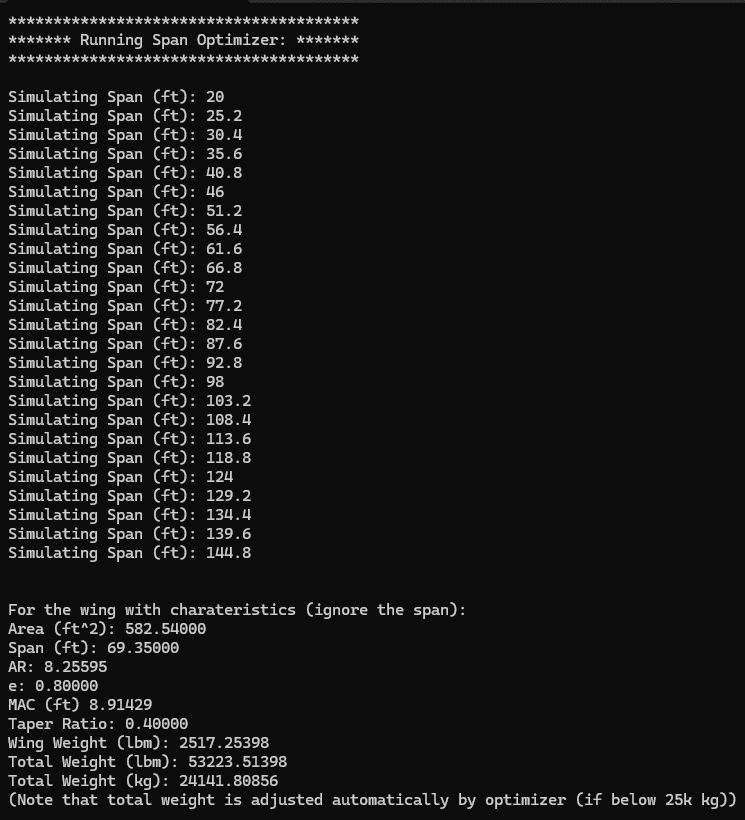
Plot it, then visually inspect, then change the range you pass into the optimizer. I believe my implementation is more useful (and the user can use it as an optimizer, as I do in the Results below, but very technically it isn’t). Additionally, to make it act more like an optimizer, the data is sorted in ascending climb time orders, and also outputted to the command window (also the sorted data is the data produced in the CSV).
Airplane Configuration Span Optimizer was run on:
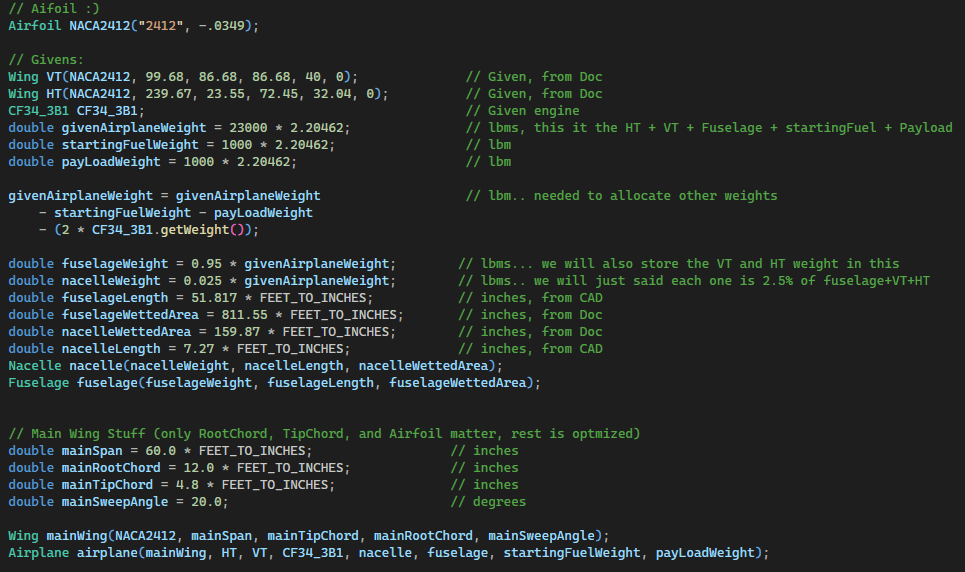 Optimization Setup Parameters (C++)
- Airfoil: NACA 2412
- Given Airplane Weight = 23,000 kg (50,700 lbm)
- Starting Fuel Weight = 1,000 kg (2,200 lbm)
- Payload Weight = 1,000 kg (2,200 lbm)
- Adjusted Base Weight = 19,500 kg (43,000 lbm)
- Fuselage Wetted Area = 75.4 m² (811.55 ft²)
- Nacelle Wetted Area = 14.9 m² (159.87 ft²)
- Main Root Chord = 3.66 m (12.0 ft)
- Main Tip Chord = 1.46 m (4.8 ft)
Initial Span Range
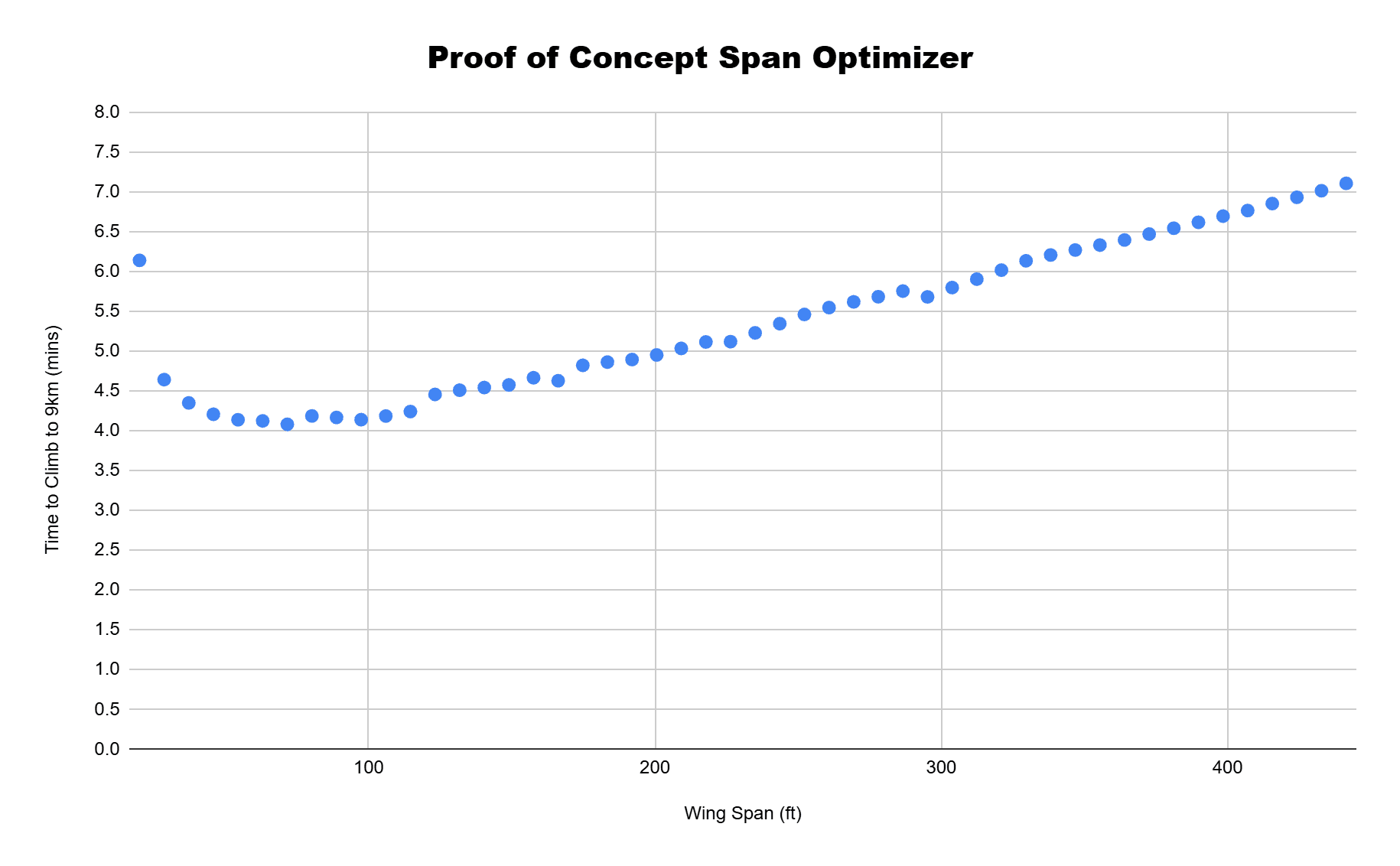
For this proof of concept, I set a very large range, 6.10 m - 137 m (20 ft - 450 ft), with 50 simulations run evenly spaced between this distance. This range was decided as anything less than 6.10 m (20 ft) is not feasible for takeoff, and then I chose an absurdly large span to capture the extreme case (even if they aren’t structurally feasible). As seen in the figure on the left, when plotted, we can see that a smaller span is not efficient; increasing the span to a higher length also eventually leads to no increase in the time to climb. This observation led me to my first revision of my span range.
First Pass Optimization
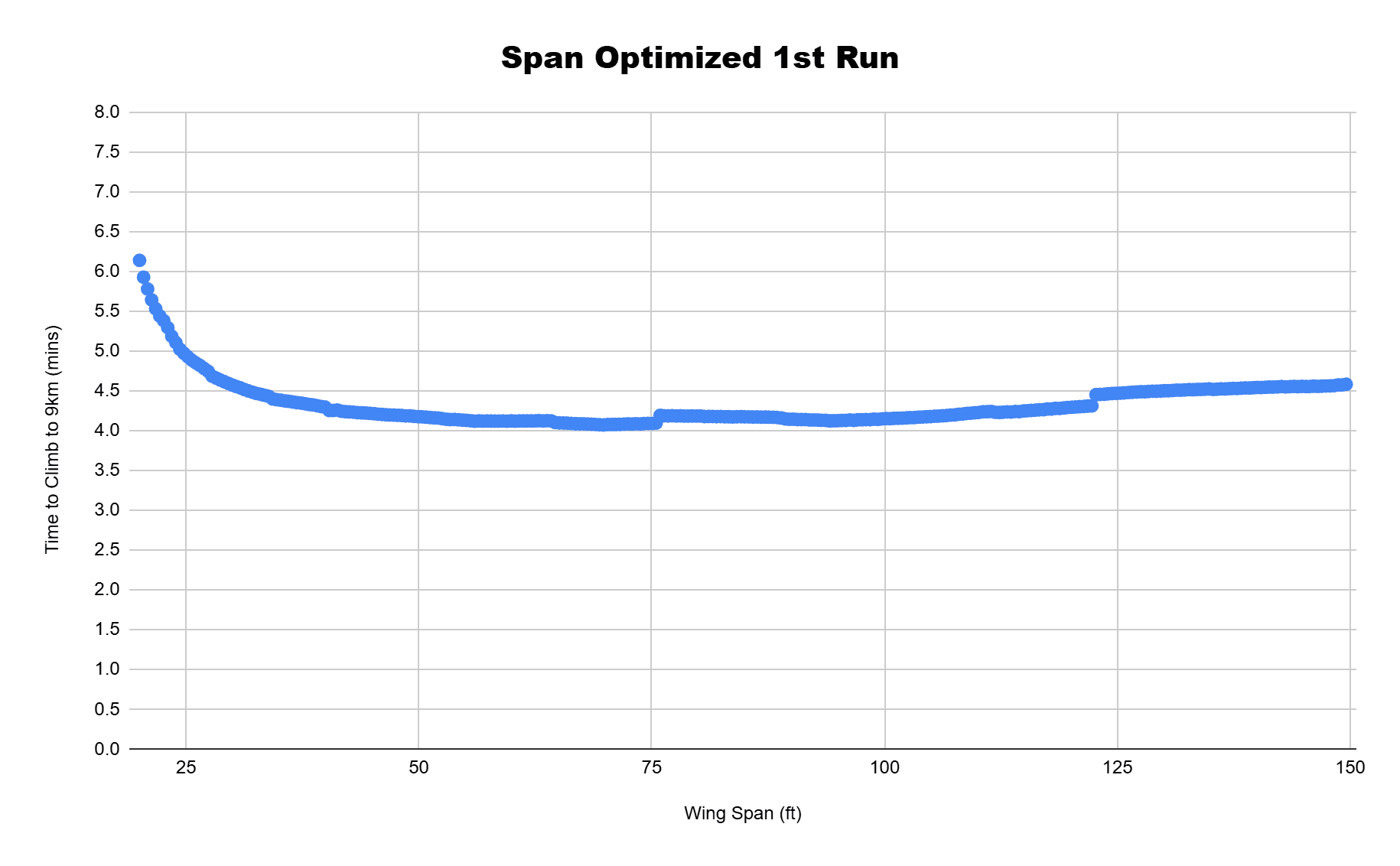
For my first (more) realistic span optimization I chose a range of 6.10-45.7 m (20-150 ft) with 300 simulations evenly spaced between the distances. In the figure on the right can be seen a more detailed trend seen as compared to my previous optimization run. The time to climb initially decreases sharply as span increases, but eventually reaches a minimum and begins to increase again. This leads me to my next tested range of 19.8-22.9 m (65-75 ft) where with one last pass I find an optimal span.
Final Span Refinement
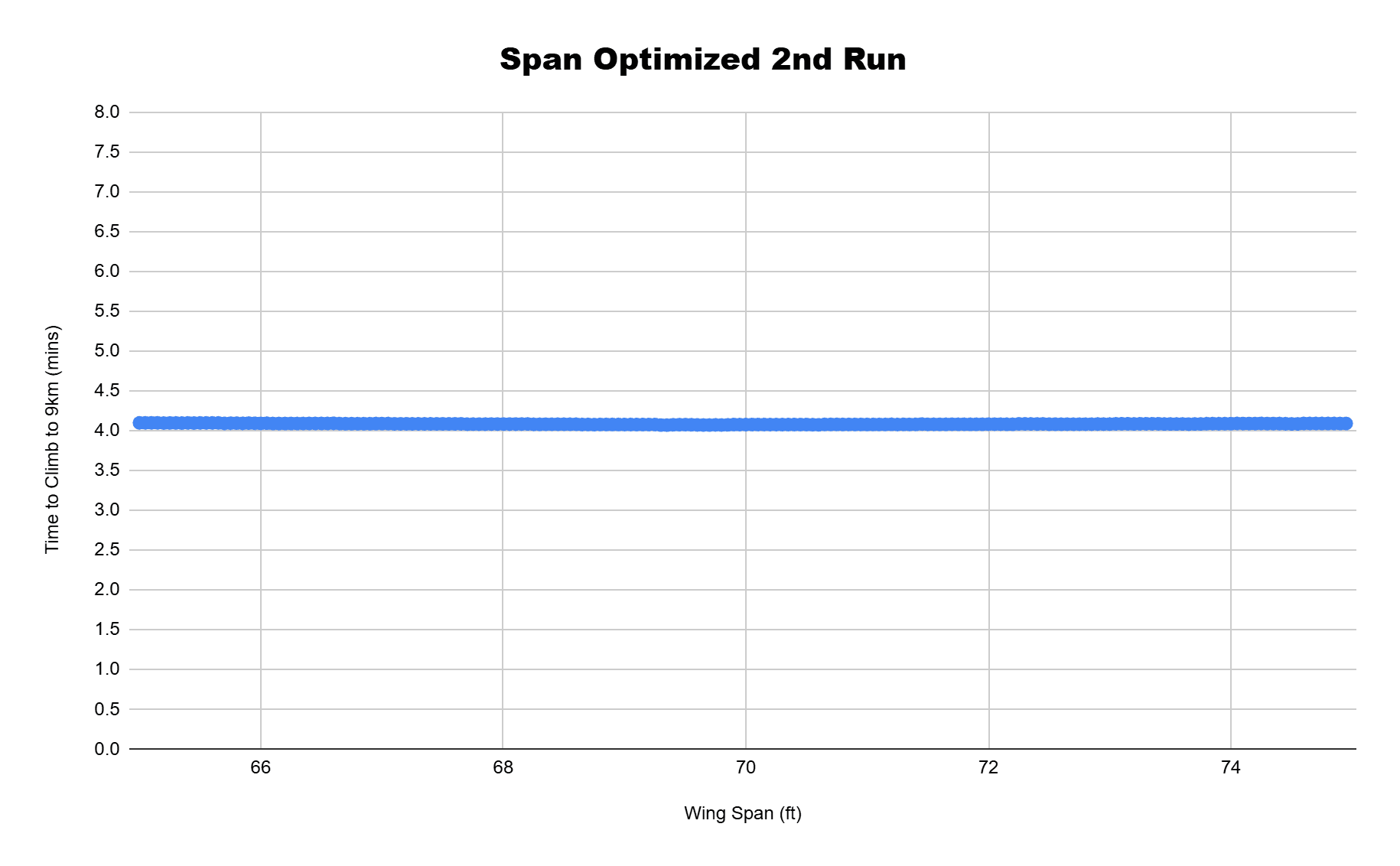
In my final span optimization I ran a range of 19.8-22.9 m (65-75 ft) with 200 simulations evenly spaced between the distances. In the figure on the left, we see less of a variation between the times to climb. When the data is all sorted and analyzed, I found the optimal span to be at around 21.1 m (69.4 ft) with a time of 4.07 min.
Sweep Angle Optimization
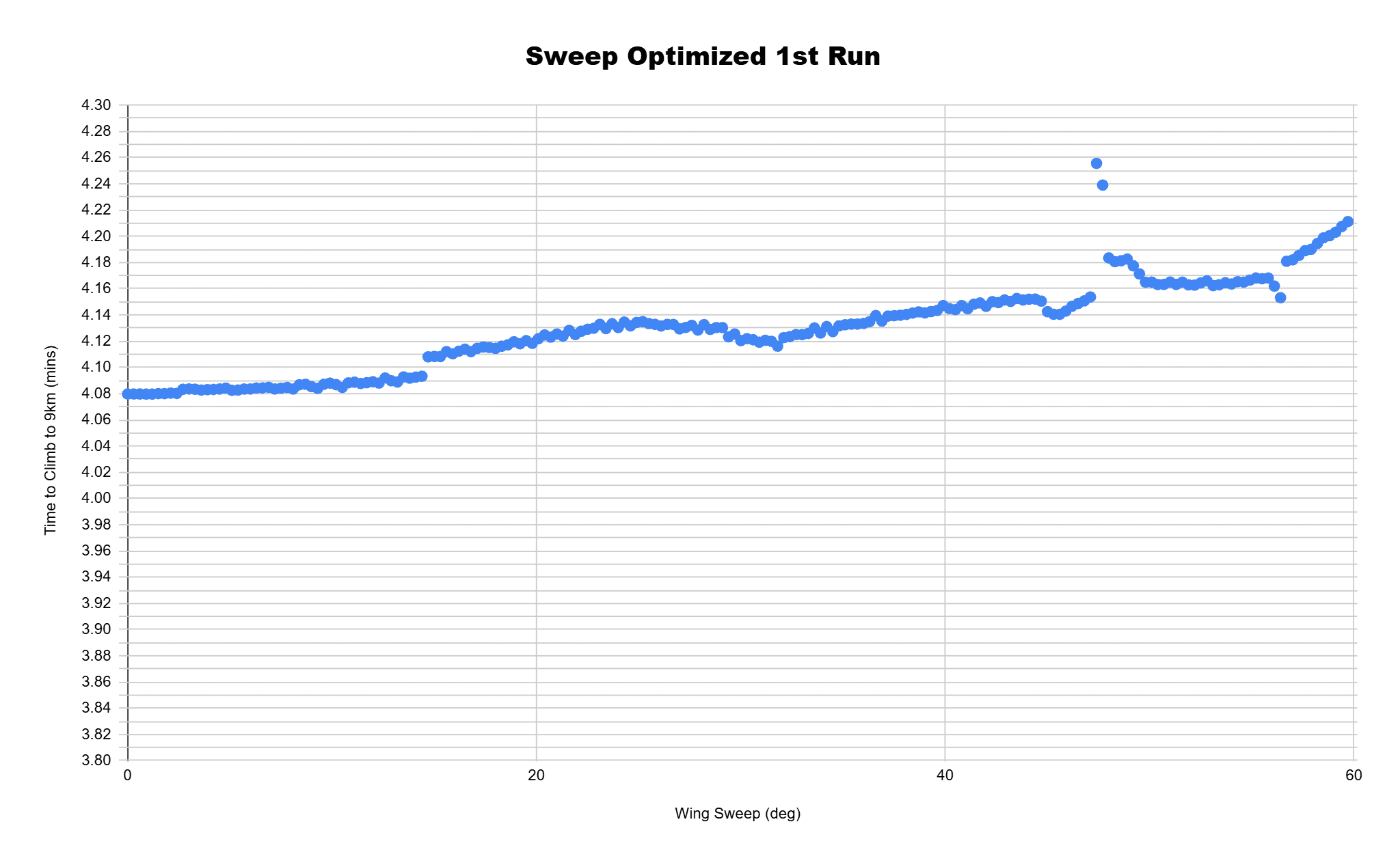
With my Span optimized I can now optimize my sweep angle. I take a similar approach and start with a wide range of 0-60 degrees, with 250 simulations evenly spaced between the angle values. Here we can see the lowest and highest values of the sweep angle are not optimal, so I will focus on the center 15-30 degrees for my second optimization runs.
I then narrowed the sweep angle range to 15-30 degrees and with 250 simulations evenly spaced between the values. I found that with a span of 21.1 m (69.4 ft) and optimal sweep of 20.0 degrees, this would give me a final time to climb of 3.96 min.